Getting started
How to Use the LeadFinder App: Your First Business Search
Follow a focused first search in the LeadFinder app: choose a business category, set a location, review available details and prepare a CSV export.
6 min read

LOCAL BUSINESS PROSPECTING
Use the LeadFinder app to search local businesses by category and location, review available contact details, and export results to CSV.
Available for Android and iPhone
 Location-based search
 Business categories
 Contact discovery
 CSV downloads
CATEGORY. LOCATION. CONTACT DETAILS.
Start with a place and a business category. Get the details you need to research the businesses that could be right for you.
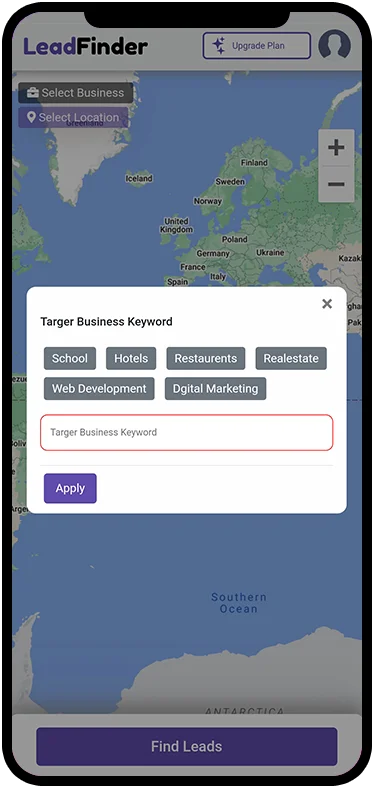
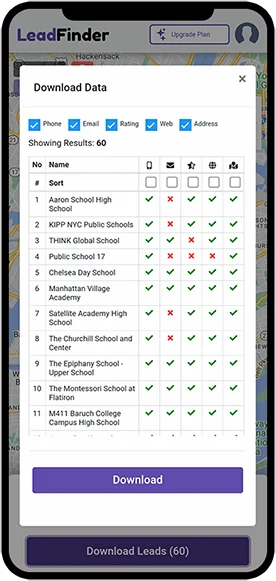
 LeadFinder app screens. Appearance may vary by version.
Pick a category, set your location and adjust the search radius around the area you want to serve.
Review websites, phone numbers and available business emails. Find a specific reason to start a conversation.
Download your results to CSV. Organize the details in your own spreadsheet and plan your next step.

REAL BUSINESSES. USEFUL CONTEXT.
The name is only the beginning. Look at the location, explore the website and decide whether your offer fits.
Explore business discovery
Details vary by business. A contact detail is a starting point for research, not a guarantee of buying interest.
FOR AGENCIES, FREELANCERS & SALES TEAMS
Build your agency's prospect list around a service you know well. Review each business, record a specific reason it fits, and plan a relevant next step.
Explore agency prospecting

A blank planning worksheet, not a lead list or an app export.
THE FIELD GUIDE
Follow a focused first search in the LeadFinder app: choose a business category, set a location, review available details and prepare a CSV export.
6 min readA practical workflow for researching local business prospects: define your market, search by category and location, review contacts and build a useful shortlist.
5 min readLearn where business contact emails come from, why some prospects have no published address, and what to check before using a discovered email.
4 min readLeadFinder helps you research businesses by category and location. Results can include names, addresses, websites, phone numbers and emails published on business websites.
Choose your intended location in the app and review the available results. Coverage and contact details vary by area and business category, so test the territory you want to research.
Open the plan screen in the app for the current price, billing period, limits and included features. Review those details before purchasing.
A business listing does not show buying intent. Review each prospect and use your own research and conversations to decide whether it is a fit.
A PLACE TO START
Choose a category. Pick a location. Explore the possibilities.