RESEARCH YOU CAN USE
From your map to your spreadsheet.
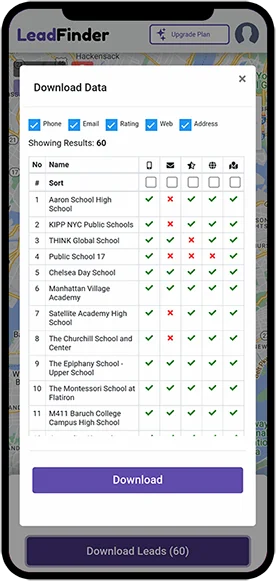
Download the business details you have found. A CSV export gives you a straightforward way to review prospects and organize your next steps.
Explore the app
Review the available fields
Results can include business names, addresses, phone numbers, websites and available emails. Check which fields appear before downloading; not every listing supplies every detail.
Open the CSV in your spreadsheet
Use the import function in your spreadsheet application. Treat phone numbers as text to preserve country codes and leading zeros, and check the column alignment before saving changes.
Make the list your own
Remove duplicates, check business websites and add your own notes. A small list with a reason for each prospect is easier to act on than an unreviewed export.
Bring it into your workflow
If your CRM accepts CSV files, check its required columns and map the fields during import. This is a file-based workflow; it does not imply a direct integration with a particular CRM.
Read the export guide