
FROM DISCOVERY TO CONTACT
Find the contact details behind a business.
Keep business research and contact discovery together. LeadFinder looks for published email addresses on the websites associated with your prospects.
Explore the app
Start with the right businesses
Search by category and location first. Email discovery is most useful when the businesses in your list are a good fit for what you sell.
Find local business prospects
Look beyond the map listing
LeadFinder checks business websites for published email addresses, including common contact pages. An email comes from the website content, rather than a promise that every map listing contains one.
Understand the gaps
Some businesses use a contact form, have no website, or do not publish an email address. Other sites may be unavailable. Phone numbers and websites can still help you review those prospects.
Check before sending
A published address can be outdated or intended for a particular department. Confirm that the address is appropriate for your purpose. Email discovery does not verify deliverability or establish permission to send a campaign.
Does LeadFinder guess personal email addresses?
The website email-discovery workflow searches published website content. Do not expect a named decision-maker or a personal email address for every business.
Can I export the available details?
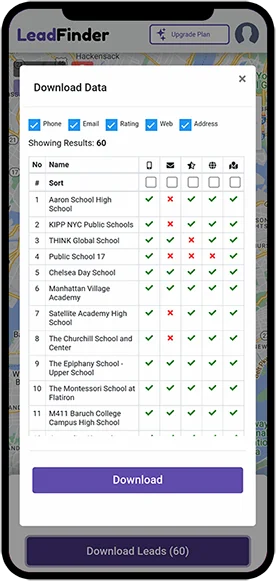
Yes. Review your results and use the download workflow to export your list. Available fields depend on each result and your plan.